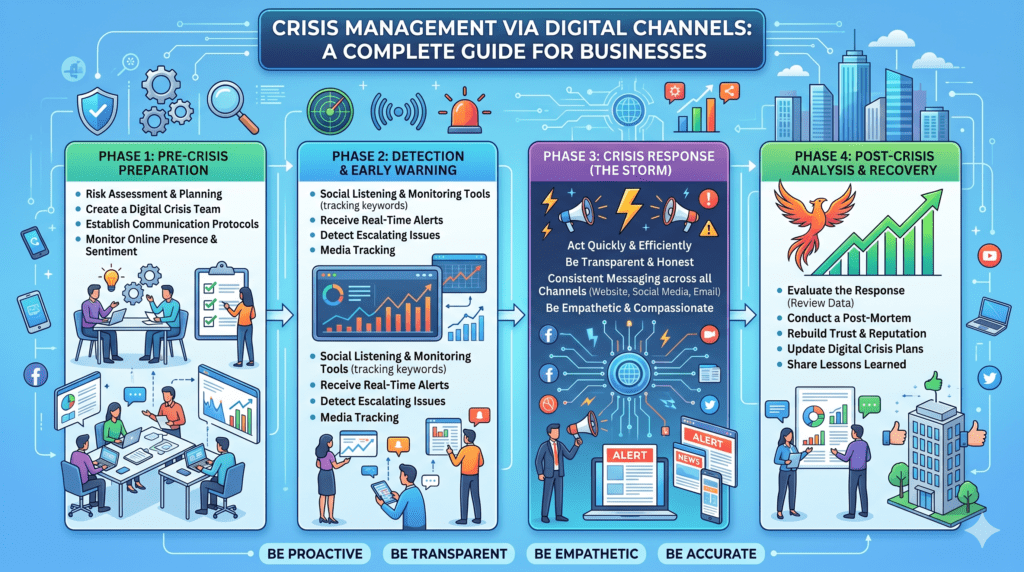
In today’s connected world, news spreads across the internet within seconds. Whether it’s a product recall, cybersecurity incident, customer complaint, service outage, or public relations issue, businesses must respond quickly and effectively to protect their reputation. Digital channels have become the primary medium for communicating during crises, allowing organizations to provide timely updates, address concerns, and maintain customer trust.
An effective digital crisis management strategy combines clear communication, transparency, real-time monitoring, and coordinated action. This guide explores how businesses can use digital channels to manage crises successfully.
What Is Digital Crisis Management?
Digital crisis management is the process of using online platforms to respond to, communicate about, and recover from a crisis affecting an organization.
A crisis may involve:
- Cybersecurity breaches
- Website or application outages
- Product recalls
- Negative social media campaigns
- Customer service failures
- Misinformation or fake news
- Natural disasters affecting operations
- Public relations incidents
The goal is to provide accurate information quickly, reduce confusion, and maintain stakeholder confidence.
Why Digital Channels Matter During a Crisis
Digital platforms allow businesses to:
- Communicate instantly
- Reach global audiences
- Correct misinformation quickly
- Provide real-time updates
- Collect customer feedback
- Monitor public sentiment
Unlike traditional media, digital channels allow two-way communication, enabling organizations to respond directly to customer concerns.
1. Create a Crisis Communication Plan Before a Crisis Happens
Preparation is the foundation of successful crisis management.
Your plan should include:
- Crisis response team
- Approval process
- Communication templates
- Official spokesperson
- Escalation procedures
- Platform-specific response strategy
Project management tools can help teams coordinate responses:
- Asana
🔗 https://asana.com/ - Trello
🔗 https://trello.com/ - ClickUp
🔗 https://clickup.com/
2. Use Your Website as the Primary Source of Truth
Your website should always provide the most accurate and up-to-date information.
During a crisis, create a dedicated page containing:
- Official statements
- Frequently Asked Questions (FAQs)
- Status updates
- Contact information
- Recovery timeline
If your website is built on WordPress, announcements can be published quickly.
3. Communicate Quickly on Social Media
Customers often check social media first during an emergency.
Use platforms such as:
- Facebook
🔗 https://www.facebook.com/ - Instagram
🔗 https://www.instagram.com/ - LinkedIn
🔗 https://www.linkedin.com/ - X (formerly Twitter)
🔗 https://x.com/
Share:
- Verified information
- Service updates
- Response timelines
- Safety instructions
- Customer support contacts
Respond professionally and avoid speculation.
4. Send Direct Customer Notifications
For important updates, use direct communication channels.
Email marketing platforms:
- Mailchimp
🔗 https://mailchimp.com/ - Brevo (formerly Sendinblue)
🔗 https://www.brevo.com/
WhatsApp Business
WhatsApp Business enables businesses to communicate rapidly with customers.
🔗 https://www.whatsapp.com/business/
Use it for:
- Emergency alerts
- Service updates
- Appointment changes
- Customer assistance
5. Monitor Online Conversations
Understanding public sentiment helps organizations respond effectively.
Social listening tools include:
- Google Alerts
🔗 https://www.google.com/alerts - Hootsuite
🔗 https://www.hootsuite.com/ - Sprout Social
🔗 https://sproutsocial.com/
Monitor:
- Brand mentions
- Customer complaints
- Trending hashtags
- News coverage
- Fake information
6. Respond Transparently
Transparency builds trust.
Best practices:
- Admit verified mistakes
- Explain corrective actions
- Provide realistic timelines
- Avoid misleading statements
- Update regularly
Customers appreciate honesty more than silence.
7. Manage Customer Support Efficiently
Crises usually increase customer inquiries.
Use help desk platforms such as:
- Zendesk
🔗 https://www.zendesk.com/ - Freshdesk
🔗 https://www.freshworks.com/freshdesk/
AI-powered chatbots can also answer common questions and reduce support workload.
8. Track Website and Campaign Performance
During a crisis, monitor digital performance closely.
Useful tools:
- Google Analytics (GA4)
🔗 https://analytics.google.com/ - Google Search Console
🔗 https://search.google.com/search-console
Track:
- Website traffic
- Popular pages
- User behavior
- Referral sources
- Search queries
This data helps identify what information users are seeking.
9. Combat Misinformation
False information spreads quickly online.
To minimize its impact:
- Publish official updates promptly
- Correct inaccurate claims with evidence
- Link customers to official information
- Encourage sharing of verified updates
Consistent messaging across all digital channels reduces confusion.
10. Review and Improve After the Crisis
Once the crisis is over:
- Analyze response times
- Review customer feedback
- Update crisis plans
- Train employees
- Improve communication workflows
Continuous improvement strengthens preparedness for future incidents.
Best Practices for Digital Crisis Management
✔ Respond quickly without sacrificing accuracy
✔ Keep messaging consistent across all platforms
✔ Designate authorized spokespersons
✔ Monitor public sentiment continuously
✔ Maintain transparency and empathy
✔ Provide regular updates until the issue is resolved
✔ Document lessons learned for future preparedness
Common Mistakes to Avoid
❌ Ignoring customer concerns
❌ Delaying official communication
❌ Posting unverified information
❌ Deleting legitimate customer feedback without explanation
❌ Inconsistent messaging across platforms
❌ Failing to update stakeholders regularly
Conclusion
Digital channels have transformed how organizations manage crises. A well-prepared strategy enables businesses to communicate quickly, reduce misinformation, maintain customer trust, and recover more effectively. By combining proactive planning, transparent communication, real-time monitoring, and continuous improvement, businesses can navigate even the most challenging situations with confidence.
For digital reputation management, website support, social media strategy, SEO, cybersecurity consulting, crisis communication planning, and digital transformation services, partner with TechsterTech—your trusted technology and digital growth partner.
🌐 Website: https://techstertech.com
📞 Contact: https://techstertech.com/contact/
Recommended Tools & Platforms
- WordPress – https://wordpress.org/
- Google Analytics – https://analytics.google.com/
- Google Search Console – https://search.google.com/search-console
- Google Alerts – https://www.google.com/alerts
- Hootsuite – https://www.hootsuite.com/
- Sprout Social – https://sproutsocial.com/
- WhatsApp Business – https://www.whatsapp.com/business/
- Mailchimp – https://mailchimp.com/
- Brevo – https://www.brevo.com/
- Zendesk – https://www.zendesk.com/
- Freshdesk – https://www.freshworks.com/freshdesk/
- Asana – https://asana.com/
- Trello – https://trello.com/
- ClickUp – https://clickup.com/